Component Presentation Schema
|
Status: Under active development. Availability: Behind the StackPacks 2.0 feature flag. Refer to Custom Integrations Overview on how to enable the feature. This documentation describes the current design intent and high-level configuration surface. Note: no behavior and capabilities have been implemented yet. As this feature is under active development; behavior, schemas, and capabilities may change as the model evolves. |
Overview
This page documents the configuration schema used by the UI Presentation model. It is intended as a reference for authors defining UI presentation behavior.
All schemas described here are part of StackPacks 2.0 and are under active development.
UI pages populated by ComponentPresentation
See the following screenshots to get an idea of which pages and UI elements on the respective pages the ComponentPresentation configuration pertains to.
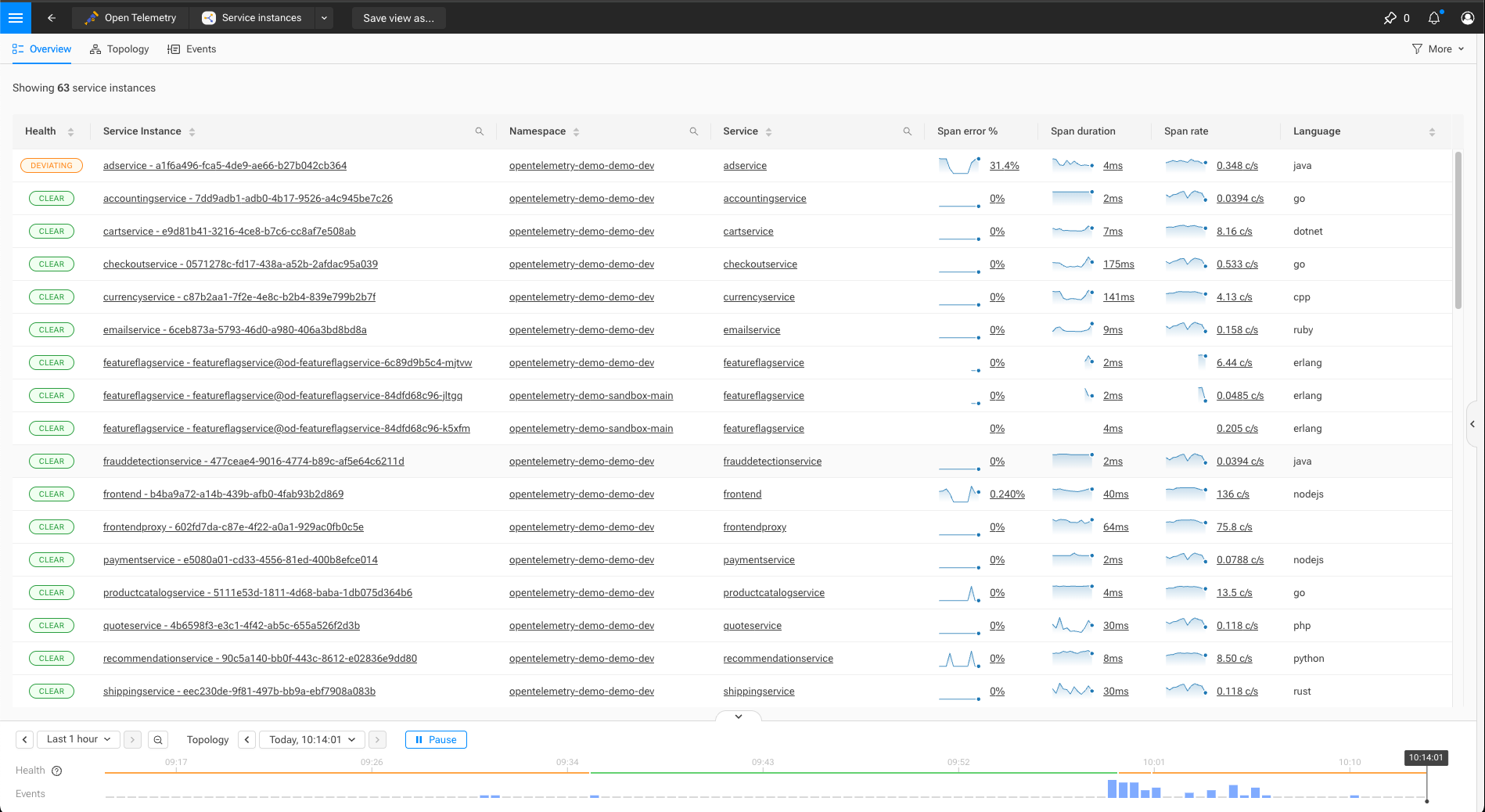
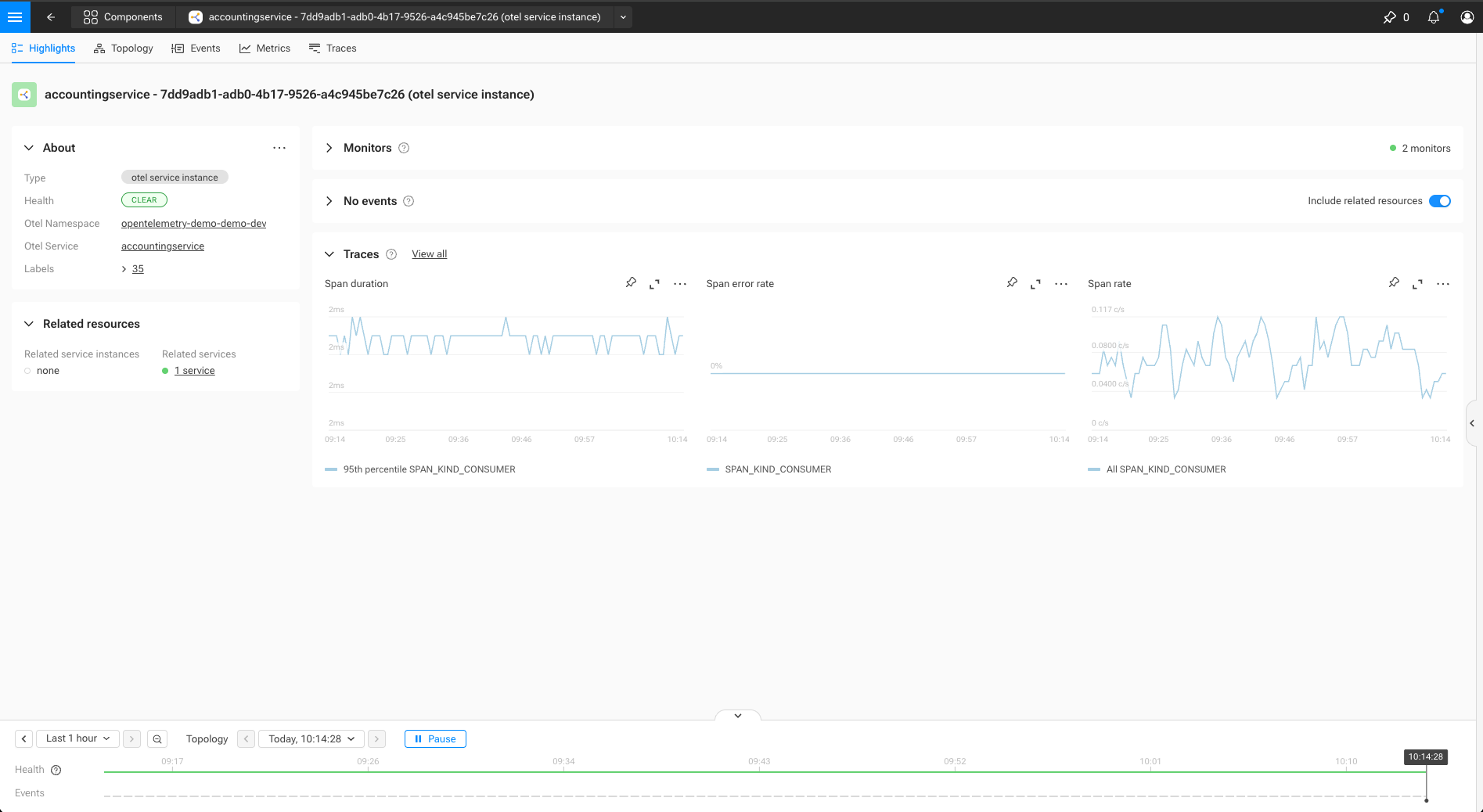
ComponentPresentation
A ComponentPresentation defines how matching components are presented in the UI
for a given mode and context.
type: ComponentPresentation
identifier: urn:...:component-presentation:<presentation-name>
name: string
description: string           # Optional description

binding:
  query: string               # Primitive STQL query that defines to which components does the presentation applies to

rank:
  specificity: number         # Higher values indicate more specific definitions

presentation:
  icon: !icon path            # Optional icon

  overview:                   # Optional overview page configuration
    name:                     # Naming configuration
      plural: string
      singular: string
      title: string

    mainMenu:                 # Optional main menu entry
      group: string           # Name of an existing MainMenuGroup
      order: number           # Order in the group - higher numbers come first
      icon: !icon path        # Optional reference to icon

    fixedColumns: number      # Optional number of columns that remain fixed when scrolling horizontally
    columns:
      - columnId: string      # identifier for the column, to be aligned with more specific/generic presentations
        title: string         # Optional
        projection:           # Optional Projection
          _type: string
          ...                 # Additional properties dependent on projection type

  highlight:                                      # Optional highlight page configuration
    title: string
    fields:
      - fieldId: string
        title: string
        description: string                       # Optional
        order: number                             # Order in the about section - higher numbers come first
        projection:                               # Optional Projection - when absent, a field defined in a more generic presentation is suppressed
          _type: string
          ...                                     # Additional properties dependent on projection type
    relatedResources:                             # Optional - related resources to display
      - resourceId: string                        # Stable identity key for merging
        title: string                             # Section heading in the UI
        order: number                             # Display order - higher numbers come first
        topologyQuery: string                     # Optional - STQL query template with ${CEL_EXPRESSION} placeholders
        presentationIdentifier: string            # Optional - references a ComponentPresentation by identifier
    provisioning:                                 # Optional section to specify how provisioning details are shown
      externalComponentSelector: cel:boolean      # Optional predicate to select the external component with provisioning details
      showConfiguration: boolean                  # Optional - should provisioning configuration be accessible
      showStatus: boolean                         # Optional - should provisioning status be accessible
    events:                                       # Optional section to configure events
      showEvents: boolean                         # Should events be shown
      relatedResourcesQuery: cel:string           # Optional - topology query for components to include
      excludeRelatedResourcesQuery: cel:string    # Optional - topology query for components to exclude of events

  filters:                    # Optional overview filters
    - filterId: string
      displayName:            # Optional - name in the menu
        singular: string
        plural: string
      menuSection: string     # Optional - section for the menu item
      filter:                 # Optional Filter
        _type: string
        ...
Identifier
Identifiers should follow the SUSE® Observability identifier (i.e., urn:…:<type>:<name>) format. Refer to identifiers documentation for more information.
Binding
The binding determines which components a ComponentPresentation applies to. Bindings are evaluated against component data and must be simple and efficient, as they are used during UI evaluation.
Currently supported binding type:
-
ComponentPresentationQueryBinding: a simple STQL query (refer to the STQL for more information). All field-based selectors (labels, layer, domain, identifiers, health state and name) are available, as is boolean logic to combine them. Only graph traversal (withNeighborsOf) is not allowed.
For overview pages, the set of ComponentPresentations that can contribute columns is determined on a query level. When there is a logical possibility for a component to match the overview query, but not the query for a particular ComponentPresentation, that presentation will not be considered.
Rank
The rank section controls how multiple matching ComponentPresentation definitions are combined.
It reflects how far down the resource hierarchy a presentation applies: from global/shared context to highly specific workload instances. Higher specificity values indicate more specialized definitions and take precedence over lower values when composing presentation behavior.
Values are user-defined but should generally increase as bindings become more specific along the resource hierarchy; the ranges below are guidelines, not enforced rules.
| Range | Use |
|---|---|
0 |
Universal base ( |
1–99 |
Environment & infrastructure (cloud, account, cluster) |
100–199 |
Platform & orchestration (k8s, otel base) |
200–299 |
Application / service |
300–399 |
Runtime / SDK / language |
400+ |
User / customer overrides |
Presentation sections
All fields under presentation are optional. A ComponentPresentation may define only a subset of presentation aspects.
Presentation sections are composed when multiple definitions apply to the same component.
Icon and name
Defines iconography and naming used across the UI. Icons can be included by using the !icon yaml tag, followed by the path of an icon relative to the icons/ folder.
E.g. !icon services/main-menu.svg can be used when the stackpack includes the file icons/services/main-menu.svg.
Overview
Defines columns shown in overview tables.
Columns may override or extend columns defined by other matching presentations.
Main menu
Controls whether matching components appear in the main menu. The menu item will open an overview page with components that match the binding query.
mainMenu:
  group: "Open Telemetry"
  icon: !icon "service.svg"
  order: 2
When the icon field is left empty, the icon on the ComponentPresentation itself will be used. The group matches a main menu group by name. The order field determines the position of the menu item in the group. An item with a higher value comes closer to the top.
The referenced menu group must be defined separately using MainMenuGroup:
_type: MainMenuGroup
identifier: urn:...:main-menu-group:<group-name>
name: string
description: string           # Optional description
defaultOpen: boolean
order: number                 # Optional order.
iconbase64: string            # Either a base64-encoded image, or a `!icon` reference to a separate image file
items:                        # Optional - kept for backwards compability, not needed for component presentations
  - viewIdentifier: string    # identifier for a (legacy) view
For backwards compatibility it is possible to list views in a group under items. Component presentations are added automatically to the group; they do not need to be added explicitly.
Although the field name suggests otherwise, the icon can be specified as !icon path-to-the-icon. This is again for backwards compatibility.
Columns
The overview section in the component presentation defines which columns should be shown and in what order. It also specifies what columns should remain in-view when scrolling horizontally, when the browser windows is too narrow to show all columns in full.
Column definitions can be completely spelled out, including title and projection, but it is also possible to inherit from other presentations. Based on the binding query, other component presentations with the same query or a strictly more generic one are considered.
Highlight
Defines fields and sections shown on highlight pages. For a component, all applicable presentations can contribute fields to display.
Each field contains a title and a projection. The title is displayed as the name of the field. The projection determines how a value, or a combination of values, are shown. Values are either expressed using CEL expressions, evaluated against the various attributes of a component, or they represent a (metric) query that can be executed. For example a ComponentLinkProjection expects 2 arguments, a name and an identifier:
fields:
  - fieldId: "namespace"
    title: "Namespace"
    order: 85.0
    projection:
      _type: ComponentLinkProjection
      name: "tags['service.namespace']"
      identifier: "'urn:opentelemetry:namespace/' + tags['service.namespace']"
A more specific presentation can override field definitions of a more generic one, e.g. for reordering or suppression. A field provided by the generic presentation can be hidden by including a field with the same fieldId, but without a projection.
The order field can take on any value, with higher values ending up closer to the top of the "About" section in the highlights perspective.
To maintain a consistent UI, we use the following conventions:
- Generic fields
-
(e.g., name, health) should use high order numbers (e.g., 80-100) to appear at the top by default.
- Specialized fields
-
should use lower order numbers to appear after generic ones.
- Overrides
-
A specialized presentation can hide a generic section (like health) or move it by overriding the field and providing a different order (e.g., a negative value to push it further down).
Provisioning
The "Show Configuration", "Show Last Change" and "Show Status" buttons reveal provisioning data. Such data is received in "External Components" - one or more sources of data.
    provisioning:
      externalComponentSelector: "matches(external.identifier, '^urn:open-telemetry:.*')"
      showConfiguration: true
      showStatus: true
Related resources
Related resources are sections on a component’s highlight page that show other components related to the one being viewed (for example, "This service instance has 5 related pods"). Each section renders as an overview table.
A related resource references another ComponentPresentation by identifier, reusing its overview spec (columns, name) for rendering. The stql field scopes which components appear in the section, and the backend intersects it with the referenced presentation’s binding query — so you don’t need to redundantly include the type filter.
highlight:
  relatedResources:
    - resourceId: "related-pods"
      title: "Related Pods"
      topologyQuery: 'withNeighborsOf(direction = "both", components = (id = "${identifiers[0]}"), levels = "1") AND type = "pod"'
      order: 100
      presentationIdentifier: "urn:stackpack:otel:component-presentation:pod"
    - resourceId: "related-endpoints"
      title: "Related Endpoints"
      topologyQuery: 'withNeighborsOf(direction = "both", components = (id = "${identifiers[0]}"), levels = "1") AND type = "endpoint"'
      order: 200
      presentationIdentifier: "urn:stackpack:otel:component-presentation:endpoint"
STQL templates
The topologyQuery field is a template string that supports ${CEL_EXPRESSION} placeholders. Each placeholder is a CEL expression evaluated against the current component’s data — the same CEL context variables are available. All expressions must evaluate to a string. Refer to the STQL reference for the available query syntax.
Merging
Related resources follow the same merge semantics as highlight fields:
-
All matching presentations contribute related resources.
-
Same
resourceIdwith higher specificity wins (override). -
Different
resourceIdvalues from different presentations are both included (append). -
The
orderfield controls display order.
A more specific presentation can override or suppress related resource definitions of a more generic one. A related resource provided by the generic presentation can be hidden by including a related resource with the same resourceId, but without topologyQuery and presentationIdentifier.
Events
Configures the "Events" section of the highlights page. Controls whether to show the section at all and, if so, events for which "related resources" to include.
The relatedResourceQuery and exludedRelatedResourcesQuery fields are template strings that supports ${CEL_EXPRESSION} placeholders.
highlight:
  events:
    showEvents: true
    relatedResourcesQuery: 'withNeighborsOf(direction = "both", components = (id = "${identifiers[0]}"), levels = "1") AND type IN ("endpoint", "pod")'
    excludedRelatedResourcesQuery: 'type = "service"'
Merging
Events use the following merge semantics:
-
All matching presentations can contribute components to include events for
-
The most specific presentation determines whether the event section is shown at all
More specific presentations can suppress related resources from more generic presentations by specifying the excludedRelatedResourcesQuery topology query.
Filters
Defines filters shown for overview pages. They can inherit their definition from more generic component presentations, in which case just specifying the filterId is sufficient. Other properties (displayName, filter and menuSection) are merged. The most specific component presentation with a property set for a filter, determines its value.
The menuSection is relevant when there are more filters than fit in the available area in the overview menu. Filters with the same menuSection are then grouped together in a dropdown.
There is currently one type of filter available:
* TagFilter: allows filtering on a tag key-value combination
- filterId: "otel_service"
  displayName:
    singular: "OTEL service"
    plural: "OTEL services"
  filter:
    _type: "TagFilter"
    tagKey: "service.name"
  menuSection: Otel
The intention is for filters to persist when navigating between overview pages. So if at all possible, try to reuse the same filter ids (with the same semantics) across different component presentations. The filters defined for all OTEL components are
-
otel_namespace(tag keyservice.namespace, menu section "Otel") -
otel_service(tag keyservice.name, menu section "Otel") -
k8s_namespace(tag keynamespace, menu section "K8s") -
k8s_cluster(tag keycluster-name, menu section "K8s")
Projections
Projections extract relevant information from a component and define how that should be presented to the user. Generally a CEL expression is used for data extraction, or a PromQL query string is interpolated.
Not every projection can be used in every context; the available projections and where they can be used is:
| Projection | Overview | Highlight |
|---|---|---|
TextProjection |
||
HealthProjection |
||
DurationProjection |
||
RatioProjection |
||
NumericProjection |
||
MetricProjection |
||
ComponentLinkProjection |
||
ContainerImageProjection |
||
MapProjection |
CEL context
CEL expressions are evaluated in an environment representing the component. The following variables are available
| Variable | Type | Description |
|---|---|---|
name |
string |
The name of the component |
typeName |
string |
The type of the component |
identifiers |
list<string> |
Identifiers of the component |
tags |
map<string,string> |
Labels of the component, in key-value pairs |
properties |
map<string,dyn> |
Properties of the component |
healthState |
string |
One of the supported health states (CLEAR, DEVIATING, CRITICAL, UNKNOWN) |
lastUpdateTimestamp |
uint |
Timestamp of last update, in milliseconds since epoch |
CEL provisioning context
When selecting an external component to provide configuration and status details, the external variable is available
| Variable | Type | Description |
|---|---|---|
external.identifier |
string |
An identifier unique to the external component |
external.syncIdentifier |
string |
The identifier of the component mapping |
external.tags |
string |
Tags contributed by the external component |
external.configuration |
string |
Configuration of the (external) component |
PromQL interpolation
In a promql query, these variables can be used to create label selectors (e.g. the_metric{namespace=${tags.namespace},ip=${properties.ip_address}})
| Variable | Type | Description |
|---|---|---|
name |
string |
The name of the component |
type |
string |
The type of the component |
layer |
string |
The layer of the component |
domain |
string |
The domain of the component |
tags |
map<string,string> |
Labels of the component, in key-value pairs |
properties |
map<string,dyn> |
Properties of the component |
_type: 'TextProjection'
value: cel:string             # Cel string for the text to display
asTag: boolean                # Optional - should the text be rendered as a tag
_type: 'HealthProjection'
value: cel:string # Cel string that represents a valid HealthState_type: 'DurationProjection'
startTime: cel:string # Cel string in ISO8601 format for start time
endTime: cel:string # Optional - Cel string in ISO8601 format for end time_type: 'RatioProjection'
numerator: cel:number # Cel number for the numerator
denominator: cel:number # Cel number for the denominator
status: cel:string # Optional - expression that evaluates to a valid HealthState_type: 'NumericProjection'
value: cel:number # Cel number for the value
decimalPlaces: integer # Optional - number of decimal places to display
unit: string # Optional - unit of the number_type: 'MetricProjection'
query: string # Parametrized PromQL query
showChart: boolean # Optional - should a chart be shown on an overview
decimalPlaces: integer # Optional - number of decimal places to display
unit: string # Optional - unit of the metric_type: 'ComponentLinkProjection'
name: cel:string # Cel string for the name of the link
identifier: cel:string # Cel string that creates a valid identifier xref:/configure/topology/identifiers.adoc[identifiers]_type: 'ContainerImageProjection'
imageId: cel:string # Cel expression for the image
imageName: cel:string # Cel expression for a name for the image_type: 'MapProjection'
value: cel:map<string,string> # Cel map<string,string> with key value pairs
asTags: boolean # Optional (default: true): should the entries be rendered as tags